

The Best 3 Tools Similar to Notion for Beginners in 2026 (Free + Paid)

If you find Notion’s steep learning curve and "blank page syndrome" overwhelming, these three beginner-friendly alternatives (Trello, ClickUp, and Coda) offer structured, cost-effective ways to manage your projects and notes without the technical headache.
We compare the most effective free and paid Notion competitors for 2026, helping you find a streamlined productivity hub that scales with your projects while remaining simple enough for immediate, daily use.
You likely have an interest in Notion, a central location for notes, tasks, and information, you simply do not need to invest your time to build a "Second Brain" from scratch. I have experienced that too.
Fortunately, there exist great Notion alternatives that may be easier to use and may provide a better learning curve, or can cost less than Notion , without having to give up anything that is important to capture notes, organize projects, or remain consistent.
This article will discuss three beginner friendly alternatives to Notion including free options and paid options, and help you decide which option works for you based upon how you really operate.
Why Look for an Alternative to Notion?
Notion is very powerful, but as with everything in life there are tradeoffs – and it really depends on whether you're a complete beginner who wants something to click quickly, or you've already figured out what you need from a tool:
- The learning curve can feel steep: When you have access to all the features such as database's, properties, relations, views etc., then once you learn them they are very powerful; however, until you figure out how to use these features, they can seem overwhelming.
- It can be overkill for personal use: If you simply want to store your notes along with a simple to-do list, Notion can seem too much like a "Swiss Army Knife" and you were looking for a "Pocket Blade".
- Pricing can escalate for teams: Notion’s paid tiers start at $10/seat/month (Plus) and $20/seat/month (Business). If you’re running a small team, that adds up fast. Check if you can get a Notion discount here.
- “Blank page syndrome” is real: Notion offers users a lot of flexibility, but many beginners require constraints, defaults, and guardrails in order to develop their ideas and build systems.
- Complex setups are fragile: Once you set-up a complex system using many different databases and link them together, making any small changes to the system can result in creating clutter and/or breaking the workflow.
- You might prefer tools optimized for one job: Some apps are simply better at doing one thing before another app is better at doing another thing, and some apps do one thing better than others, and therefore some apps are better suited for being used as a "task first" or "doc first" app rather than as a "workspace".
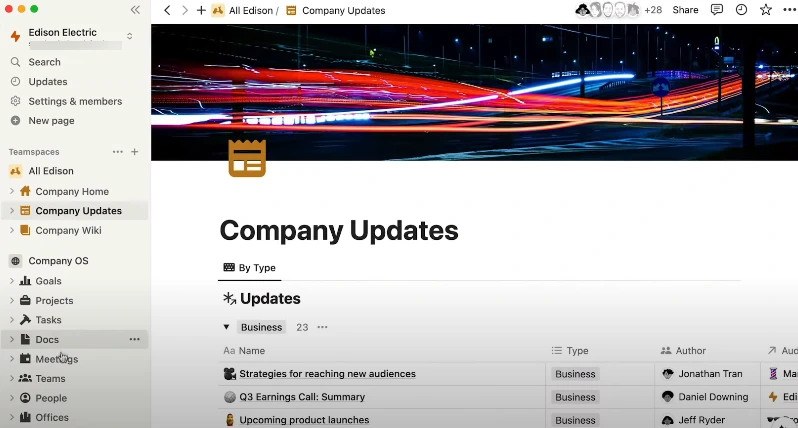
Essentially, your productivity tool should support your work rather than becoming a second job itself. If you find yourself constantly fixing broken links or staring at a blank screen, it is time to move to a system that provides the structure you need right away. The right choice is the one that lets you focus on your actual priorities instead of the software.
3 Best Alternatives to Notion (For Beginners)
I picked these three because they’re genuinely easier to adopt than Notion while still covering the core “Notion-like” needs: organizing work, writing notes, and collaborating without a ton of setup.
Alternative #1 – Trello
TL;DR: Trello is the easiest way to organize yourself fast using a clean, visual process without creating a database or building a page from scratch, just a board, lists, and cards.
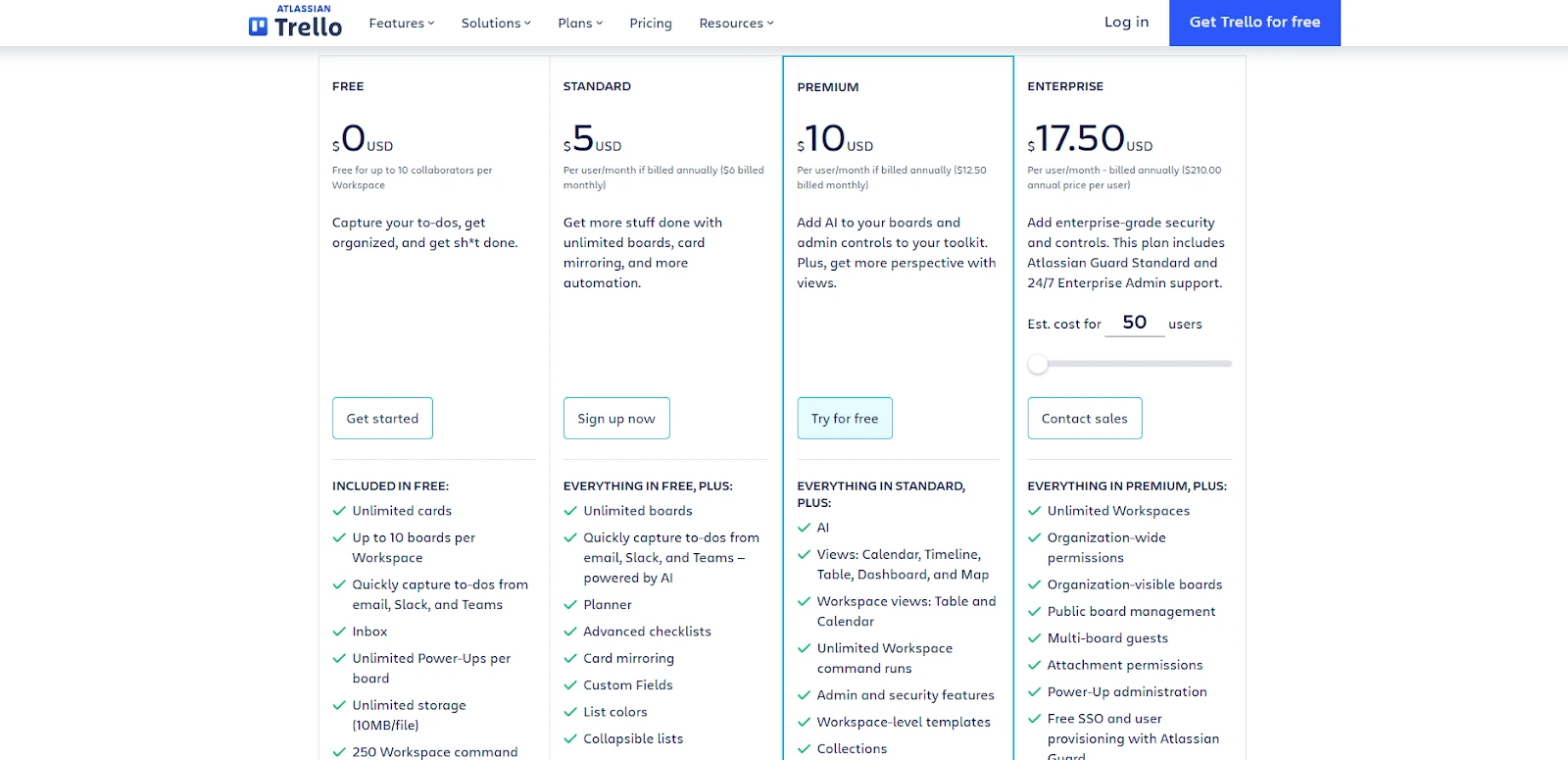
Pricing: Trello has a Free plan, with paid plans starting around $5/user/month (Standard, billed annually) and $10/user/month (Premium, billed annually). See Trello pricing.
Why Trello feels “Notion-like” for beginners: Notion can perform Kanban, however, you typically need to build a database, define properties, create a board view, and then maintain organization. Trello begins in the place that most beginners prefer to begin: A board that makes sense.
Example use case: Freelancers handling their first freelance clients can create a board named "client work" which contains lists such as: "Inbox", "Doing", "Waiting", and "Done". Each card is an individualized small package of work (brief, checklist, deadline, attachments, etc.).
Advantages:
Pros:
- Beginner-proof onboarding: boards, lists, and cards are instantly intuitive.
- Great for lightweight project management (personal or small teams).
- Templates + add-ons (Power-Ups) let you expand only when needed.
Cons:
- Not a full workspace/wiki replacement, long-form documentation is not its main strength.
- Complex operations workflows may require add-ons or stricter conventions.
Best for: Beginners who want simple task tracking, visual clarity, and minimal setup.
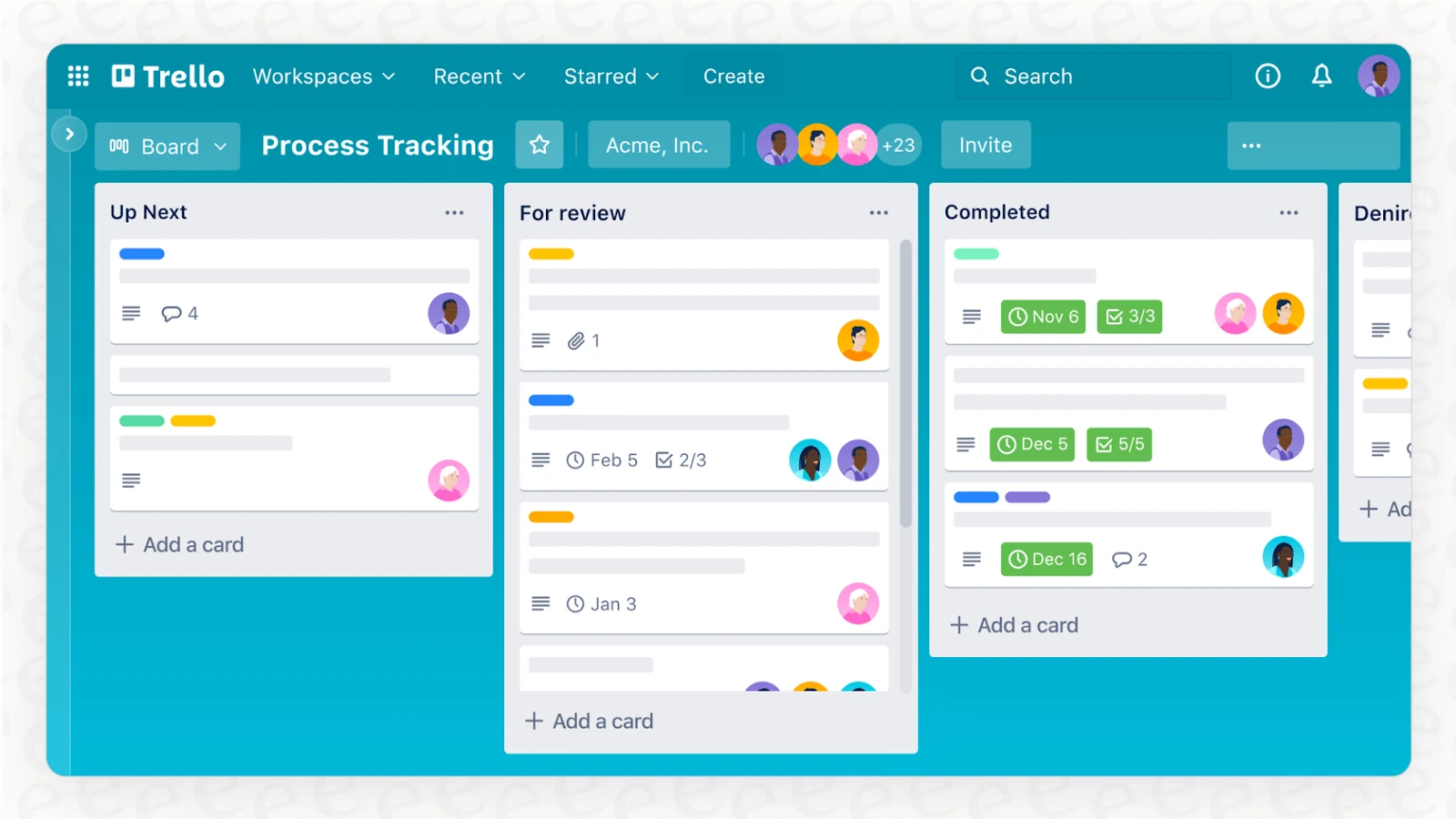
Trello works because it mirrors how we naturally organize things on a desk or a whiteboard. You can skip the technical setup and start moving cards around immediately. It is the right move if you want to see your progress at a glance without managing the back-end logic of a database. It handles the basics of project tracking so well that you won't miss the extra bells and whistles.

Alternative #2 – ClickUp
TL;DR: Clickup is for those looking for a structured way to tie tasks & docs, as well as some built-in project management defaults beyond what you would see in Notion.
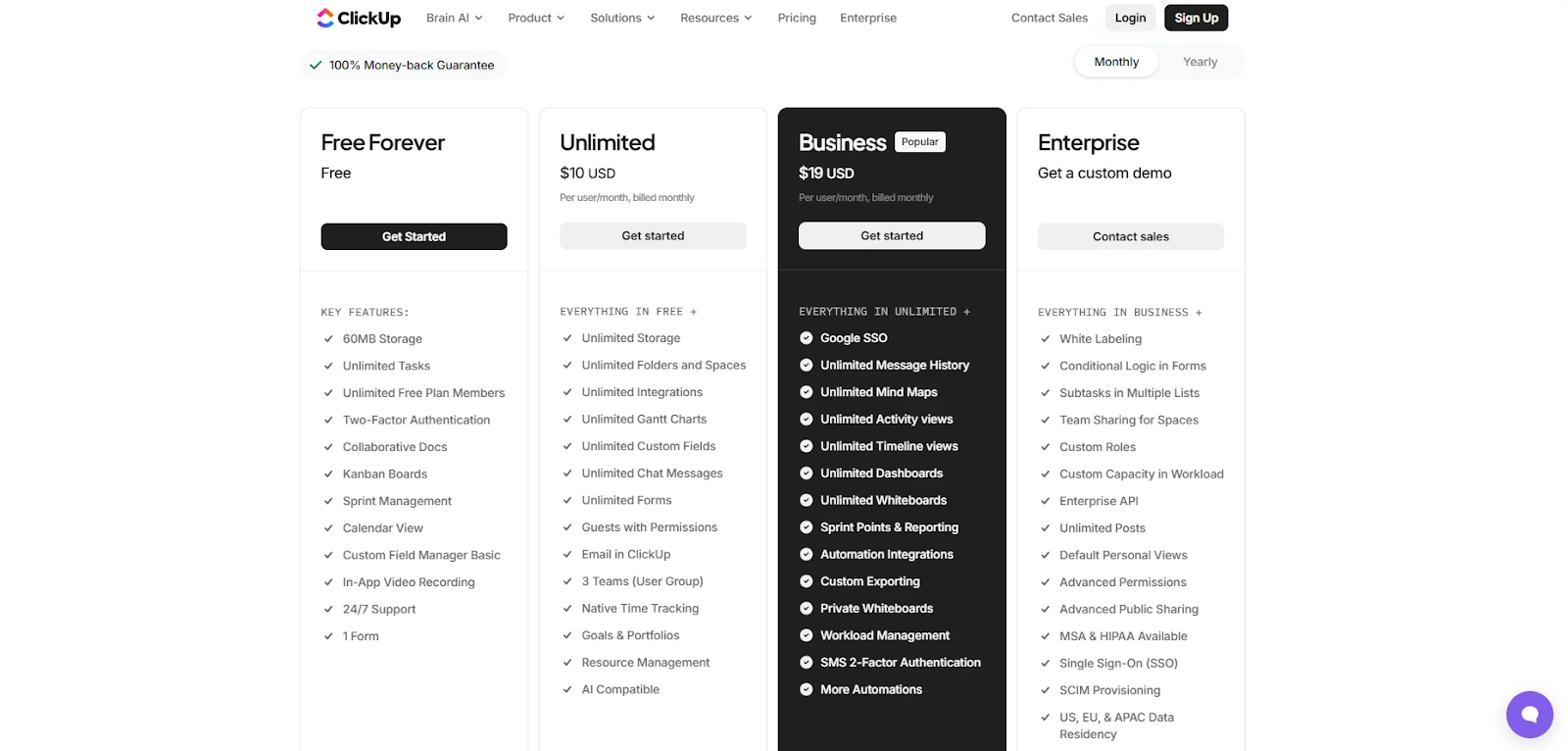
Pricing: ClickUp offers a Free Forever plan, with paid plans starting at about $7/user/month (Unlimited, billed yearly) and $12/user/month (Business, billed yearly). See ClickUp pricing.
Why ClickUp works for beginners: As stated earlier, Notion is very flexible, however, ClickUp is more "I will provide the structure for your workflow". When a new user is learning how to use an app, this can be less overwhelming because there are fewer decisions that have to be made around how they will execute their workflow.
Example use case: If you’re launching a small product, you can keep:
- a Backlog list with priority + due dates,
- a Sprint board for current work,
- and Docs for specs and meeting notes, all in the same workspace.
Pros:
- Strong task management out of the box (statuses, assignees, views, dependencies on higher tiers).
- Docs + tasks connect naturally, so notes become actionable work.
- Good scalability from solo use to small teams and startups.
Cons:
- Feature richness can feel busy if you don’t hide what you won’t use.
- You’ll get best results with a small amount of workspace cleanup (naming, folders, views).
Best for: Beginners who want to grow into a real project management system without losing docs and knowledge sharing.
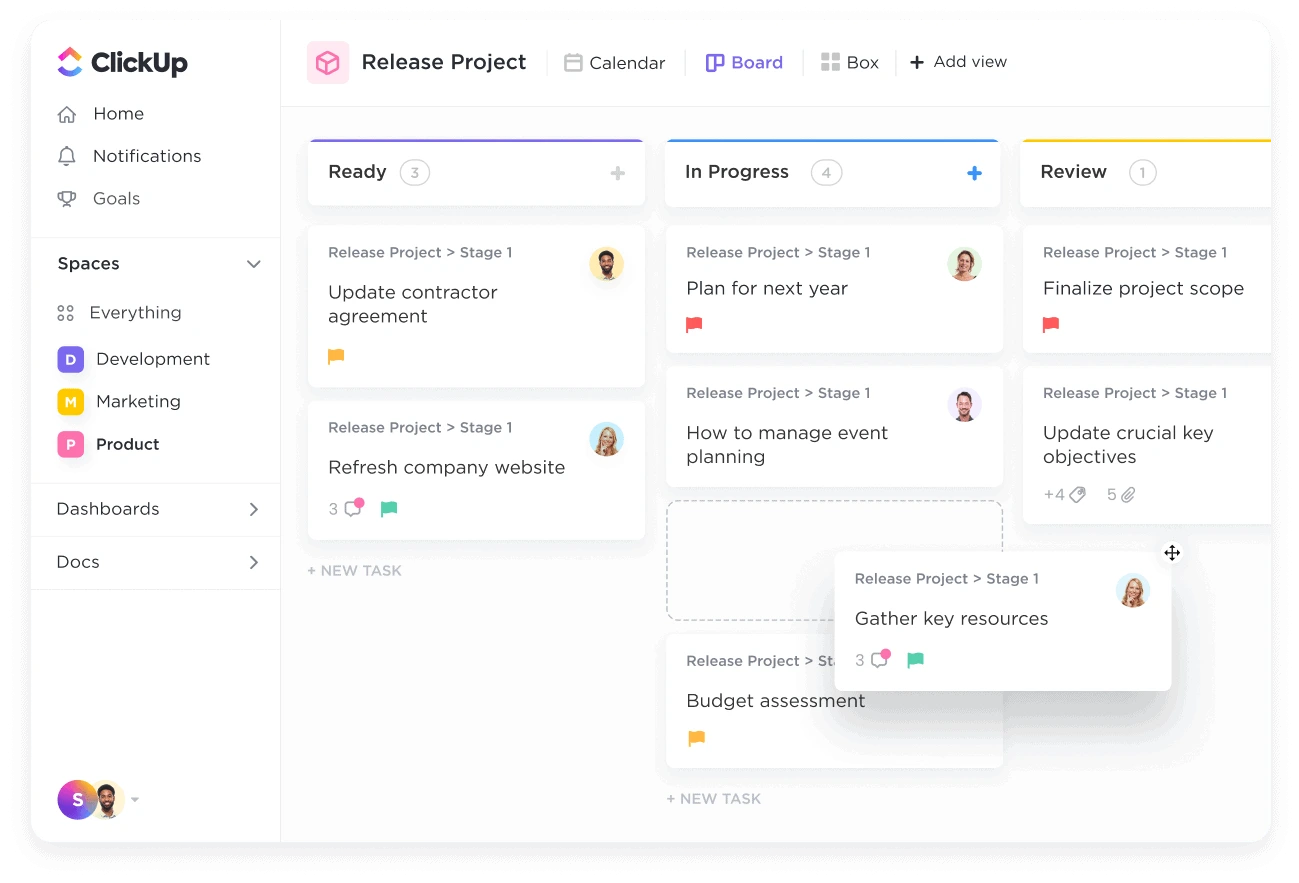
Essentially, ClickUp is built for people who want to spend their time finishing tasks rather than designing them. While Notion asks you to be an architect, this tool acts more like a project manager that has already laid the groundwork for you. It is a reliable choice if you need a workspace that scales with your ambition without requiring constant technical maintenance.

Alternative #3 – Coda
TL;DR: Coda is a good choice if you like documents but wish they could function like lightweight applications (with tables, buttons and workflows) with less setup.
Pricing: Coda has a Free plan. Paid plans typically start around $12/month per Doc Maker (Pro, billed monthly) and go up from there. In Coda’s model, you generally pay for “makers,” while editors/viewers may be free depending on your setup. See Coda pricing.
Why Coda is beginner-friendly (in a different way than Trello): Trello is "task-based". Coda is "document-based," but has enough structure to encourage users into creating some helpful systems: trackers, checklists, pipelines, and simple dashboard views.
Example use case: Create a “Weekly Planning” doc with:
- a table for tasks (owner, status, deadline),
- a meeting notes section,
- and a simple view filtered to “Due this week.”
Pros:
- Docs that can act like apps (tables, formulas, automations, buttons).
- Great templates for trackers and recurring processes (ops, product, projects).
- Maker pricing can be cost-effective if only a few people “build” and many people “consume.”
Cons:
- Still a powerful tool, if you only want plain notes, it’s more than necessary.
- Maker billing is different from typical per-seat pricing, which can confuse teams at first.
Best for: Beginner users who want a document workspace like Notion but also need structured trackers and workflows
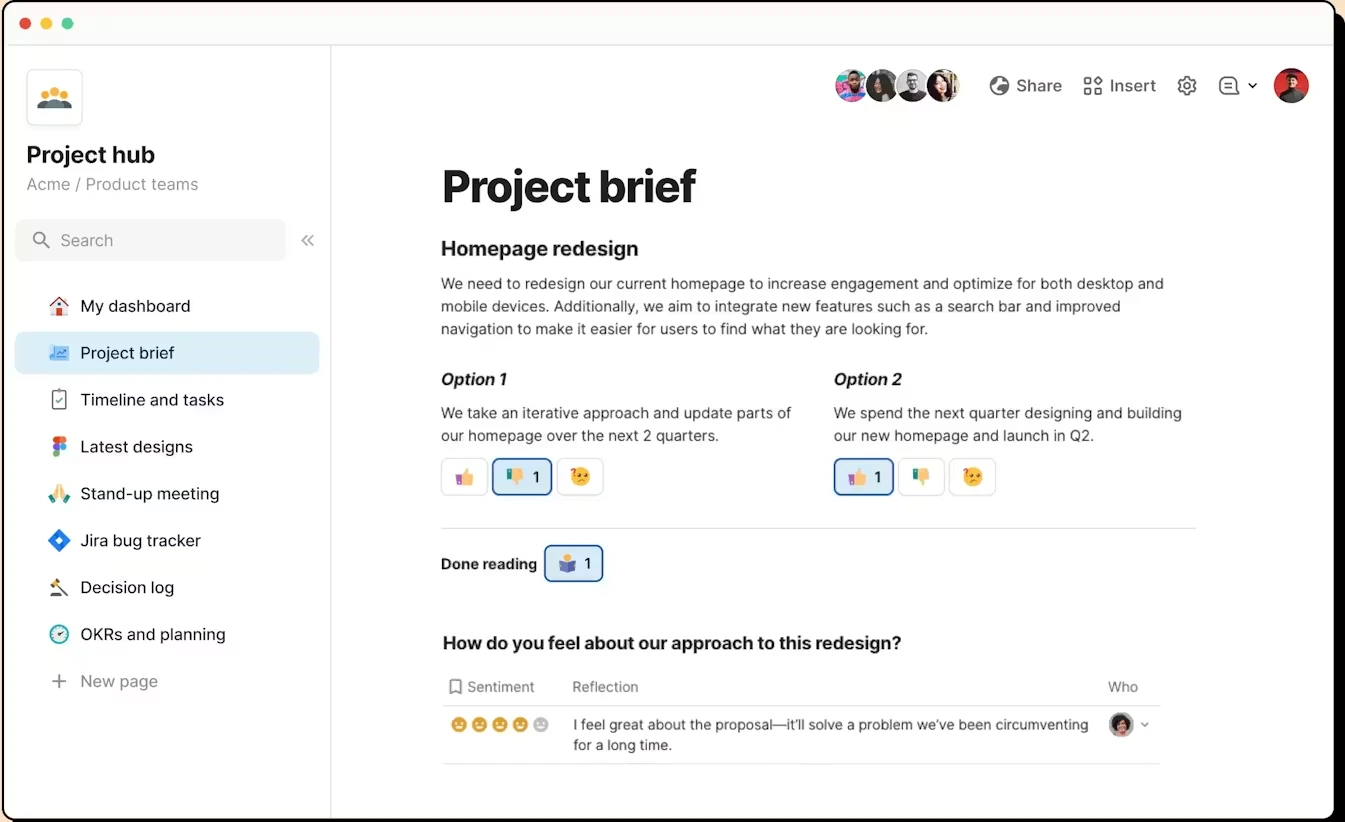
Coda is the right choice if you find Notion’s documents a bit too static and wish they could "do" more. It is built for people who want a workspace that feels like a custom-made application rather than just a digital notebook. While it takes a little more time to understand the logic behind its tables and buttons, the result is a system that automates the boring parts of your day so you can focus on the actual work.

Notion Alternatives Compared: Pricing, Best Use Case & Ease of Use (Table)
Here’s the quick comparison view. (Prices can change; always double-check the official pricing pages.)
If your priority is “get moving today,” start with Trello. If you want the most balanced all-in-one setup, ClickUp is hard to beat. If you love docs but want more structured workflows, Coda is a strong pick.
How to Choose the Best Alternative to Notion (as a Beginner)
Beginners should start by determining if they will be using their chosen alternative to manage task lists or to store knowledge. Task first alternatives like Trello will serve you well as long as you are looking for a solid workflow with deadline reminders, priority levels and “next step” capabilities.
If you have projects and also documentation that needs to be referenced from your workflows, ClickUp can typically be an easier transition than other options.
Coda is a good option when you think of documents and need them to feed into trackers and simple processes.
Then validate the basics: free plan limits, sharing permissions, mobile comfort, and the integrations you’ll actually use (Google Drive, Slack, calendar).
Trello: Best free Alternative for beginners who want simple task management
Trello’s free plan is one of the cleanest ways to avoid paying for Notion while still staying organized, especially if your “Notion use” is mostly checklists, personal projects, and straightforward workflows.
On Trello Free, you can create a practical system in minutes: a board for life admin, a board for learning goals, and a board for work, each with lists like “To do / Doing / Done.” That gives you real momentum without designing a workspace.
Free-plan advantage vs Notion: Trello is essentially “Kanban by default.” In Notion, you can get to the same place, but beginners often spend time building the database, configuring properties, and tuning views before they actually do the work.
Limitations to be aware of: Trello’s free plan has constraints (for example, board limits per workspace and feature gates), so if you want advanced views and heavier reporting, you’ll likely upgrade.
Trello: the Cheapest Alternative to Notion
If your number one criteria is that something is "less expensive" than Notion, then Trello will be the easiest pricing choice of the two for most new users.
The basic plan of Notion is $10 per user per month on the Plus Plan, with Trello's Standard tier coming in at approximately $5 per user per month when charged yearly. To put it another way: Trello can cost about 50% less for an entry-tier paid option, based on how much you pay and which options you select. ([notion.com](https://www.notion.com/pricing))
In addition to price, Trello has scope limitations compared to Notion. The paid versions of Notion offer a wider "workspace" experience (documents, database, team spaces, permissioning) than does the Trello Standard version, which is intended to help scale boards, lists, automations, and task-based execution every day. If your primary focus is "track tasks, get things shipped," you likely won't feel like you're missing out on all of this additional functionality.
ClickUp: the best value for money
My #1 pick as the "best bang for your buck" in terms of value, is ClickUp. While cost isn't necessarily the determining factor when deciding which tool will best meet an individual's needs, when I recommend ClickUp to individuals who are new to project management tools, I do so largely because it includes multiple tools in a single solution.
In fact, much of what makes ClickUp a strong competitor to Notion is its free version offers a great deal for those just getting started; including tasks, documentation, and a limited set of views. At approximately $7 per user/month (based upon a yearly contract) the unlimited version of ClickUp unlocks the majority of the features that provide the greatest benefit to users; additional storage, additional views, additional integration options and fewer limitations on how you use the application.
Where ClickUp outperforms Notion in terms of providing the most value: Like Notion, ClickUp provides the ability to manage projects and create a workflow that facilitates the management of these projects. However, for many individuals, while they may be able to build a visually pleasing space in Notion, they have difficulty creating a process that enforces completion and delivery of their products or services. In this regard, ClickUp provides many of the same benefits as Notion, however, ClickUp also encourages the development of operational habits through its use of statuses, due dates, ownership, and repeatable workflows. ClickUp encourages "ship-and-deliver," where Notion is more focused on "arts-and-crafts."
FAQ about Notion alternatives
What’s the best free Notion alternative for beginners?
For a "free, start today" experience, Trello is generally the best free Notion alternative for beginners, especially if your primary focus is on managing tasks. However, while ClickUp and Coda offer a "free plan", these tools will generally require a bit of time to get into the right flow of using them.
Which tool is the closest competitor to Notion overall?
“Closest” depends on what you use Notion for. If you care about an all-in-one work hub with tasks and docs, ClickUp is a strong Notion competitor. If you care about doc-based workflows (docs + tables + automations), Coda is often the closest conceptual match.
How can I reduce my Notion costs without losing productivity?
Firstly, audit your usage to determine what you are truly utilizing: if your utilization is primarily focused on task tracking, then moving the task-tracking layer to Trello will greatly reduce the pressure to spend additional money.
Secondly, if you have a team, determine whether you only need a couple of individuals to create systems and the remainder of the team members simply need access to the system, then consider a maker-based model (such as Coda) to limit the number of creators that count towards your paid user total.
Thirdly, check for promotions; there is a Notion promotional code available here.
Is Notion too complex for personal notes and simple to-do lists?
Yes, it can. If you find yourself thinking "I am trying to capture some quick notes fast, track a few priorities and not think about it", Notion might be overwhelming. Most people prefer to use a simpler tool that promotes consistency over complexity.
Can I migrate from Notion easily (pages, notes, tasks)?
Migration can be done, but rarely perfectly. To do it practically, try to migrate the top 20% of the content that you regularly refer to (i.e., active project files, recurring notes, important documents), rebuild your workflows natively in the new tool, and leave Notion to be read-only for one month to prevent data loss.
The Best Notion-Like Tools for Beginners in 2026
Simplifying this choice: If I am looking at the simplicity of use, then I would say that Trello is the best way to start; it is the cleanest entry point, fast, and visually easy to manage. ClickUp is my pick when I need a full-service platform where all components push your projects forward, rather than just moving them from page-to-page. And Coda is an excellent solution when you are looking to have your documents function as a structured workflow (without having to be a scientist). The goal isn’t to find the tool with the most features, but the one that makes you feel the most capable. It is better to have a simple board you actually use than a complex workspace that sits empty because it feels like a chore to open.
You may also view our complete list of Notion alternatives and look for a Notion promo code before deciding to commit to using Notion. The right choice should feel like it is doing the heavy lifting for you, giving you back the mental energy you used to spend on organization.
{{cta-marketplace="/blog-elements"}}