
Mixpanel for Beginners: Learn the Basics of Analytics

Start using Mixpanel with ease to track events, build cohorts, and turn data into clear insights that improve engagement and product growth.
Analytics made simple. Discover how Mixpanel can help you track, measure, and grow your product’s success.
Are you wondering what Mixpanel is all about and, above all, how it can be useful for your analytics? You’re at the right place!
Mixpanel is a leading analytics platform that allows businesses to measure user interactions with their website or mobile app. In this beginner-friendly guide tailored just for you, I’ll walk you through the basic understanding of Mixpanel, its practical usage, and delightful features that immediately help you track & analyze behaviors, boost your user engagement, and ultimately create superior digital experiences.
Don't fret if you're entirely new—this guide is simple to follow and will walk you through every step. By the time you finish, you’ll not only know how Mixpanel works but also how to spot opportunities in your data that you might otherwise miss.
What is Mixpanel?
Mixpanel is a SaaS analytics tool that helps businesses understand how users engage with their websites, apps, and digital products in real time. By tracking detailed user actions, Mixpanel enables companies to monitor user behavior, measure feature adoption, and improve overall customer experience.
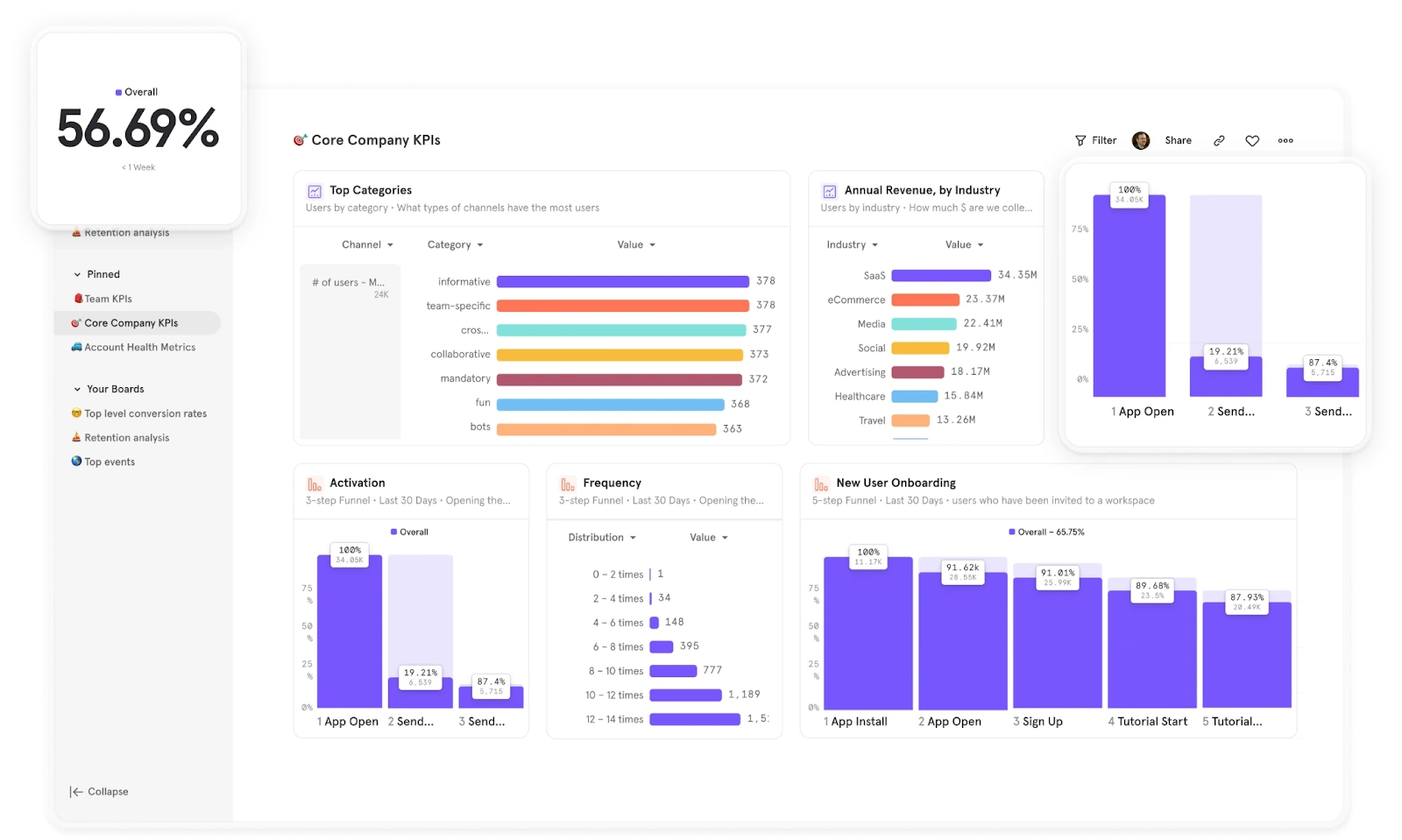
Its primary advantage lies in turning complex usage data into clear, actionable insights: you quickly identify, for instance, the buttons users click most, which workflows they used, and the features they genuinely appreciated.
For example: Imagine you launched a new chat feature in your app. Through Mixpanel, you can quickly see how many users open the chat each day and exactly how they use it. Such insights can drastically refine your decisions and increase user engagement.

Why Should Beginners Use Mixpanel for Analytics Tracking?
As someone new to the game, Mixpanel offers standout advantages perfectly suited for the analytics novice:
- Simplicity: Beginner-friendly interfaces allowing you ease, even without analyst skills.
- Quick insights: Immediate visual insights about popular features and engagement patterns.
- Real-time: Instant feedback on users' behavior updates as interactions happen.
- Cohorts: Easily group (segment) your users by certain user characteristics and actions without any complicated setup.
- Targeted action: Focus energy precisely on features and propositions that clearly resonate with your audience.
For beginners, Mixpanel makes it easier to understand what’s happening inside your product without getting lost in complex dashboards.
Getting Started with Mixpanel: Step-by-Step Guide
Let's quickly but clearly guide you through the setup process and how to get started:
Step 1 — Creating & Configuring your Mixpanel Account
- Sign up on Mixpanel’s website and answer a few quick onboarding questions
- During setup, add your project or webpage/app.
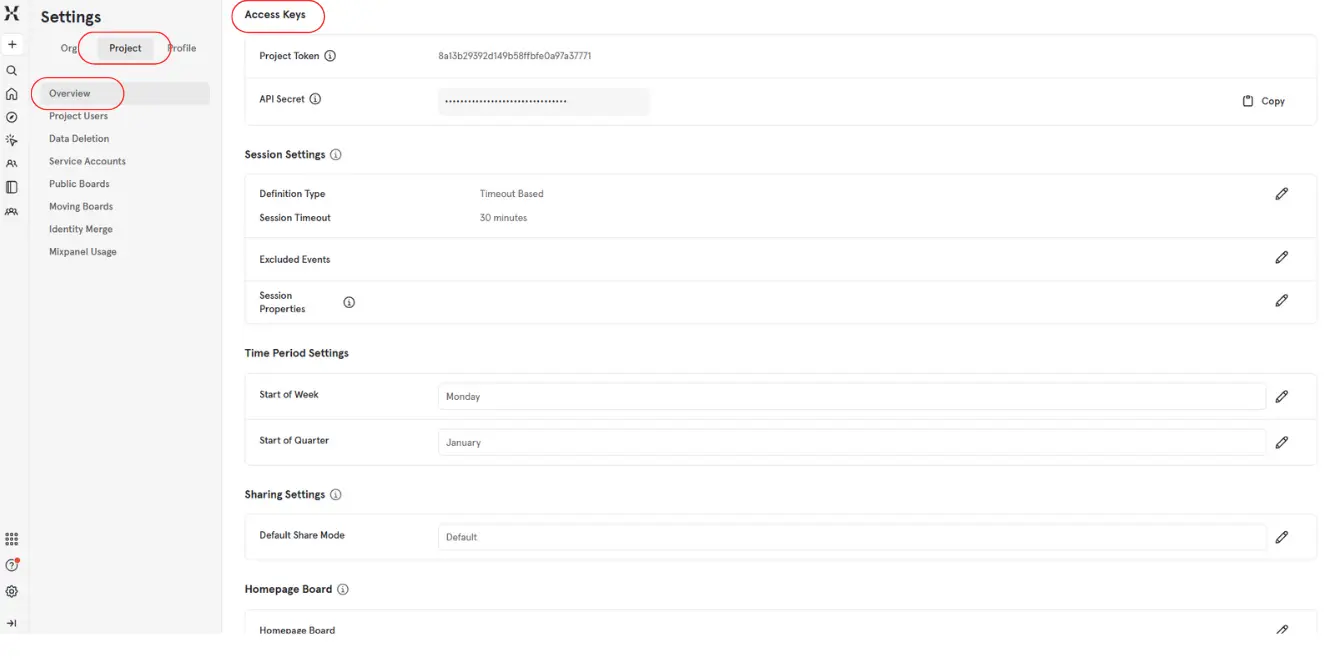
- Find your unique Mixpanel Token, you’ll need this for any integrations.
Step 2 — Installation & Integration
- Install the Mixpanel SDK for your platform (JavaScript, iOS, Android, etc.).
- Add the SDK snippet to your site or app code.
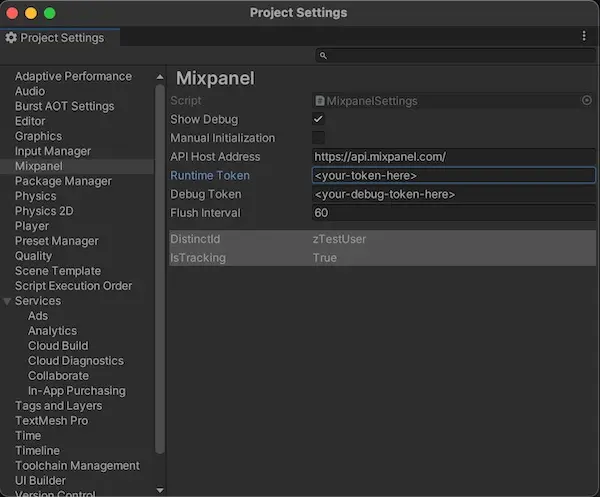
- Initialize Mixpanel with your project token so events are tracked correctly.
Step 3 — Creating Your First "Event"
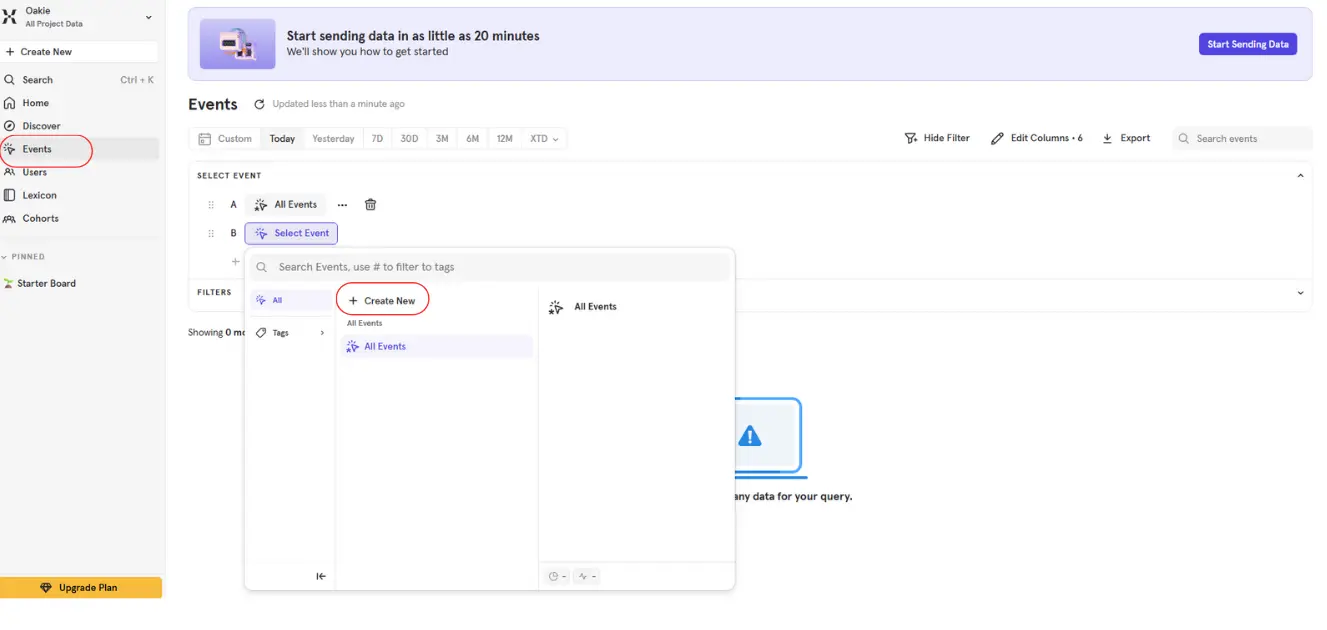
- Go to the Events tab and click "Add".
- Define your event criteria—for example "user clicked download button".
- Start tracking data and viewing insights instantly.
Step 4 — Reviewing Your Basic Analytics & Reports
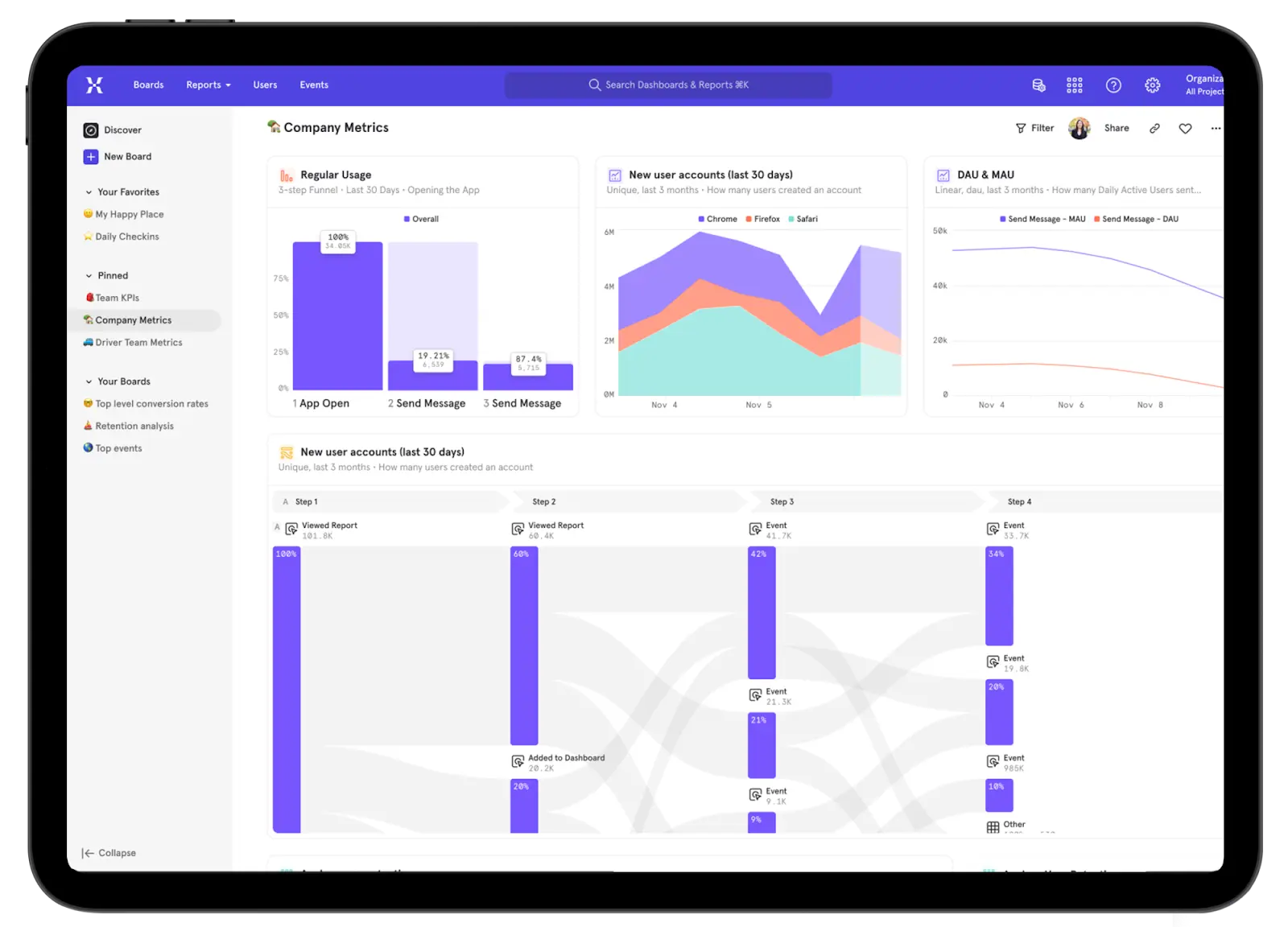
- Check your collected data through the event insights dashboard.
- See usage trends at a glance and compare key metrics easily.
How to Use Mixpanel for Analytics on Your Website or App?
Integrating Mixpanel into your app or site significantly streamlines your data processes:
- Define easily traceable events (actions)—e.g., pages visited, buttons clicked.
- Easily gain visual insights on popular behaviors, paths users favor, or features that drive engagement.
- Identify precisely where users face friction that might affect conversions and satisfaction.
Let's briefly illustrate this: You've added a new payment system to your site. Using Mixpanel, effortlessly observe how smooth the navigation feels to users or if specific payment options lead to "abandon-cart-scenarios."
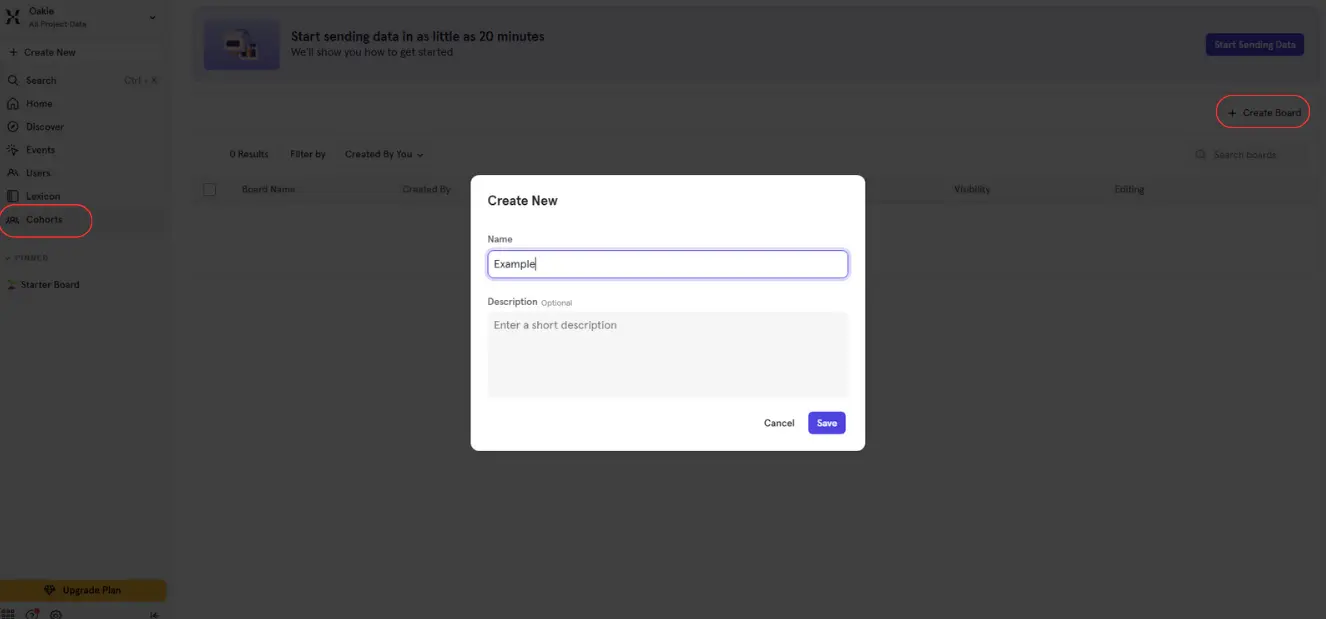
Creating Cohorts in Mixpanel
A cohort is simply a clever segmentation to precisely analyze certain audiences. Maybe you only want analytics on people that arrived through Facebook Ads vs others. Cohorts let you create these user "groups" simply and effectively. Or perhaps you want to refine knowledge of recently subscribed accounts' behaviors during the first visits.
You can build cohorts effortlessly (definitely without being an analyst genius!):
- Select "Create cohort".
- Define ideal conditions—Sources, Signup date, Specific activities.
- View comparison results instantly in a clear, visual format.
Exporting Data in Mixpanel
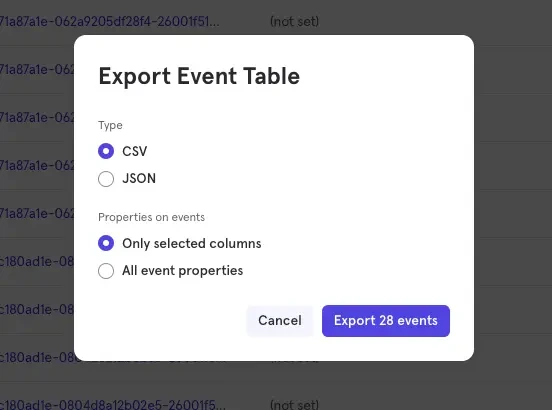
A proper analytics platform also plays well with others. Exporting data not only provides transparency and easy sharing, but also unlocks possibilities beyond Mixpanel’s own features:
Follow these quick steps for smooth exporting:
- Log in and navigate to "Data Management."
- Click "Export data", selecting a file format (Export as CSV or Excel).
- Specify the date range and contents to create customized reports.
Managing Events in Mixpanel (Deleting & Editing)
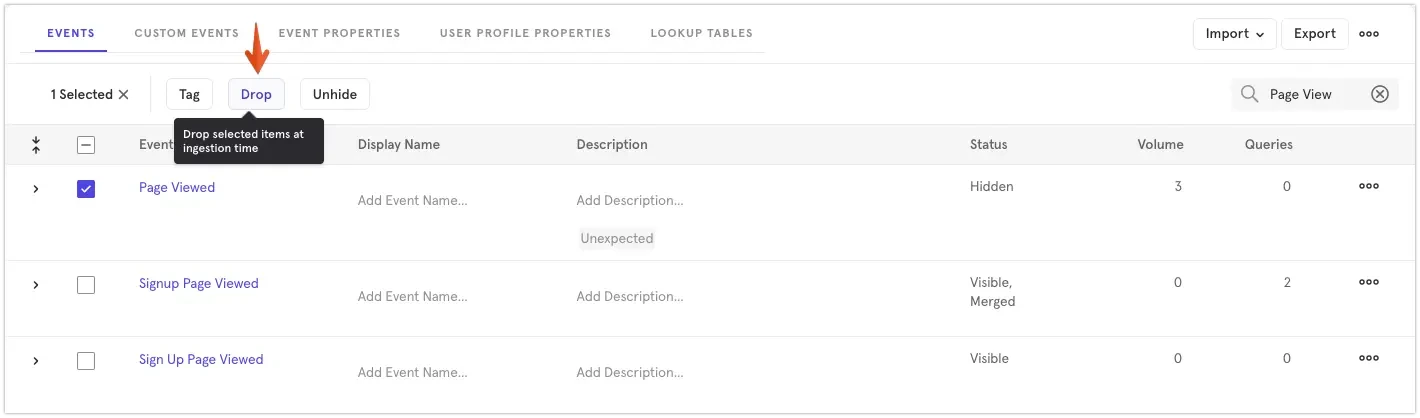
As routinely challenging as it sounds, Mixpanel makes adjusting historical events hassle-free:
- Simply go to "Events Management”.
- Decide on events to correct or remove permanently.
- Confirm the deletion or modification for immediate processing.
A scenario where this is crucial: If an error arises that falsely inflates your interaction numbers, knowing how to fix it right away keeps your analytics accurate and ensures decisions are based on reliable data.
Tracking Users' Feature Adoption of a New Functionality
Let's clarify with a simple, beginner-friendly example:
You’ve just launched a booking tool and want to know if people actually complete a booking. Set up Mixpanel events such as “Book Clicked” and “Booking Finished,” then review the drop‑off rate in the Event Paths report to find out where users abandon the flow. Use those insights to quickly spot friction and refine the experience, letting real data guide every improvement.
Measuring User Onboarding Effectiveness
Here’s another practical, beginner-friendly way to see Mixpanel’s potential in action:
Track events that mirror each milestone in your flow—“Sign‑Up”, “Profile Setup”, “Watched Tutorials”, “Fully Onboarded”, and then watch the funnel in real time to see exactly where people drop off. If a specific step (like profile setup) causes users to leave, you can address that friction right away and preserve future conversions that might otherwise be lost.
Choosing the Best Plan for Beginners
Mixpanel makes it easy for beginners to get started with a plan that’s simple and affordable:
- Free Starter Plan: This plan lets you try out Mixpanel’s core analytics features with no cost or limits on basic usage which is ideal for testing and learning.
- Step-by-step upgrades: As your needs grow, you can move to paid tiers that unlock collaboration tools, advanced segmentation, and powerful data modeling, without overwhelming you from the start.
For newcomers, Mixpanels’s Starter plan offers a straightforward way to explore its core analytics tools without any upfront cost. You can get comfortable with the basics, see how the platform fits your workflow, and only upgrade when you’re ready for more advanced features.
Mixpanel Tutorial: Frequently Asked Questions (FAQ)
How do I quickly find my Mixpanel project token?
Open Mixpanel, go to Settings / Project settings and copy the Project Token shown there. You’ll need it to connect your tracking code to the right project.
What’s the simplest way to add Mixpanel to a CMS like WordPress?
Use a trusted analytics or tag manager plugin (ex. Google Tag Manager, Insert Headers and Footers) to paste the Mixpanel snippet once across your site. No need to edit your theme files. You can manage future changes from the plugin interface.
I accidentally recorded the wrong events. Can I clean them up?
Yes. First, stop the incorrect event at the source (fix the code or turn off its trigger). Then use Mixpanel’s Lexicon to hide or rename events, or drop them from reports. For permanent removal, the Data Pipelines / EU Deletion API can erase data, but do it carefully as deletions are irreversible.
How can I export Mixpanel data for deeper analysis or reporting?
From any report, click Export and choose CSV or JSON for quick download. For regular or large exports, use the Mixpanel Export API (or Data Pipelines to BigQuery/Snowflake/Redshift). Define exactly which events/properties you need so files stay manageable and secure.
What does the Free Starter plan include?
Mixpanel lets you track up to 1 million monthly events, invite unlimited teammates, save five reports per seat and replay 10,000 sessions each month at no cost.
Will I lose data if I go over the Free limit but don’t upgrade?
Your events are still collected, but report access is restricted to five days until you choose a paid tier.
Does Mixpanel offer starter discounts?
Early‑stage companies under five years old with ≤ US $8 M funding get their first year of Mixpanel free via the Startup Program.
Mastering Mixpanel – My Personal Conclusion
As an analyst who genuinely enjoys Mixpanel, and has tested plenty of other platforms, I find its clarity, simplicity, and pricing make it an excellent place to start your analytics journey.
If you’d like to see how Mixpanel compares with other platforms before committing, take a look at our Mixpanel alternatives guide for a side‑by‑side view of features, pricing, and setup effort.
You’ve now seen how to build actionable insights in the real world: creating cohorts, tracing user paths, measuring feature adoption, and turning those findings into growth. In short, you’ve learned to understand your users more deeply and act on that knowledge. What often surprises new users is how quickly even a single tracked event can start shaping smarter product decisions. You don’t have to wait months to see value.
Dive in with confidence, your analytics journey starts here.
{{cta-marketplace="/blog-elements"}}