
Getting started with Xero’s Basics & Essentials

Xero is a beginner-friendly cloud accounting platform that simplifies invoicing, expense tracking, and financial management, helping small business owners manage their finances smarter, not harder.
New to Xero? This guide walks you through the basics so you can manage your finances smarter, not harder.
Starting your accounting journey with Xero may seem daunting, especially if you’ve never touched a bookkeeping program before. So let me open with a reassuring thought: Xero is specifically designed for beginners and non-accountants. As a cloud-based software-as-a-service (SaaS) program in the area of accounting, it delivers a fabulous interface for all its users, enabling them to streamline everything from performance ‘dashboards’ to the reconciliation of payments. What makes Xero stand out is how intuitively it connects your financial world, from invoicing clients to tracking expenses, without overwhelming you with jargon or unnecessary features. It’s less about learning accounting from scratch and more about organizing your work in a way that makes sense.
So whether you are a freelancer or a founder of a small business or an office manager who finds themself managing the books somewhat suddenly and in a confused state, this guide will nourish you step by step with screenshots, simple language and creative advice.
Every section will be aimed at giving you practical value and will have tangible examples along the way. Follow every tip outlined if you would like to:
- understand what Xero actually is,
- find out how it can instantaneously place clarity (and perhaps a little fun) into the business chores which you perform every day,
- discover how to use it with no previous knowledge of accounting,
- manage your finances with confidence.
By the time you reach the end of this guide, you’ll have more than just a surface-level understanding of Xero. You’ll know how to make it work for you, saving time, staying organized, and feeling more confident about your numbers. Let’s get started!
What is Xero?
Xero is a leading accounting software platform in the cloud targeted at small businesses, sole traders and accountants who want good tools without the complexity of a big business system. With access on any device, Xero provides a central point of access to the things required for every day accounting activity: invoicing, bank reconciliation, payroll, managing claims for expenses and reports that are real time.
So, what are the things that make Xero different? It’s the intuitive interface combined with an automated way of working, saving hours of time for the inexperienced operator with smart reconciliations, one click expense claims and dashboards that invite interaction. Also, bank-level safety means that protection exists for your personal finances. To understand the degree of effect this can have, think of a consultant who can issue branded invoices while queueing for his daily cappuccino or to check payment of invoices on his phone after a client appointment. This is accounting brought to man!
Why Should Beginners Use Xero for Small Business Accounting?
For someone discovering accounting software for the first time, Xero is packed with comforts and smart touches:
- Effortless Onboarding: Setup is filled with nudge-by-nudge help, little room for doubt, even for absolute beginners.
- Foolproof Bank Feeds: Connect your business bank accounts in a couple of clicks. Instantly see and reconcile daily transactions. No messy CSVs, lost paperwork or sleepless nights sorting through errors.
- Professional Invoicing & Quotes: Create, modify and send invoices directly from your dashboard (drag in your logo in seconds!).
- Mobility & Real-Time Data: Work from your laptop or phone. All the data auto-syncs so there’s no chance your numbers are out of date or locked on a single device.
- Time-Saving Automations: Schedule repeating bills, set up auto-reminders for overdue payments, or create templates for jobs that recur with clients.

Getting Started with Xero: A Step-by-Step Beginner Guide
Ready to get your hands dirty (but not muddy)? Let’s walk through the essentials, ensuring you lay strong foundations from day one.
1. Creating and Configuring Your Xero Account
Navigate to Xero’s sign-up page, and enter your basic business details. They will take you through the method in a series of boxes and friendly nudges. Give your business name, validate your email address, note down your password somewhere safe and log in.
In your initial configuration, set basics like your organization name, country, and fiscal year start month.
Take a breath, the hardest part is over!

2. Connecting Your Bank Account
Sync time: From within the Xero dashboard, go to the ‘Accounting’ tab and select 'Bank accounts'. Follow through to link up your main business checking account securely (some banks use automatic feeds, and others require manual imports). This will not only allow for visibility of your real-time transactions but also ensure that you have access to Xero's best feature: bank reconciliation.
Avoid using personal accounts here to keep things as organized as possible down the line.

3. Customizing Your Chart of Accounts
If “Chart of Accounts” feels intimidating, rest easy. Xero’s default chart covers common small business needs already (sales income, rent, tax, payables, and so on).
Edit only if special expense or revenue categories are required (for example splitting income by product lines).

4. Creating and Sending Your First Invoice
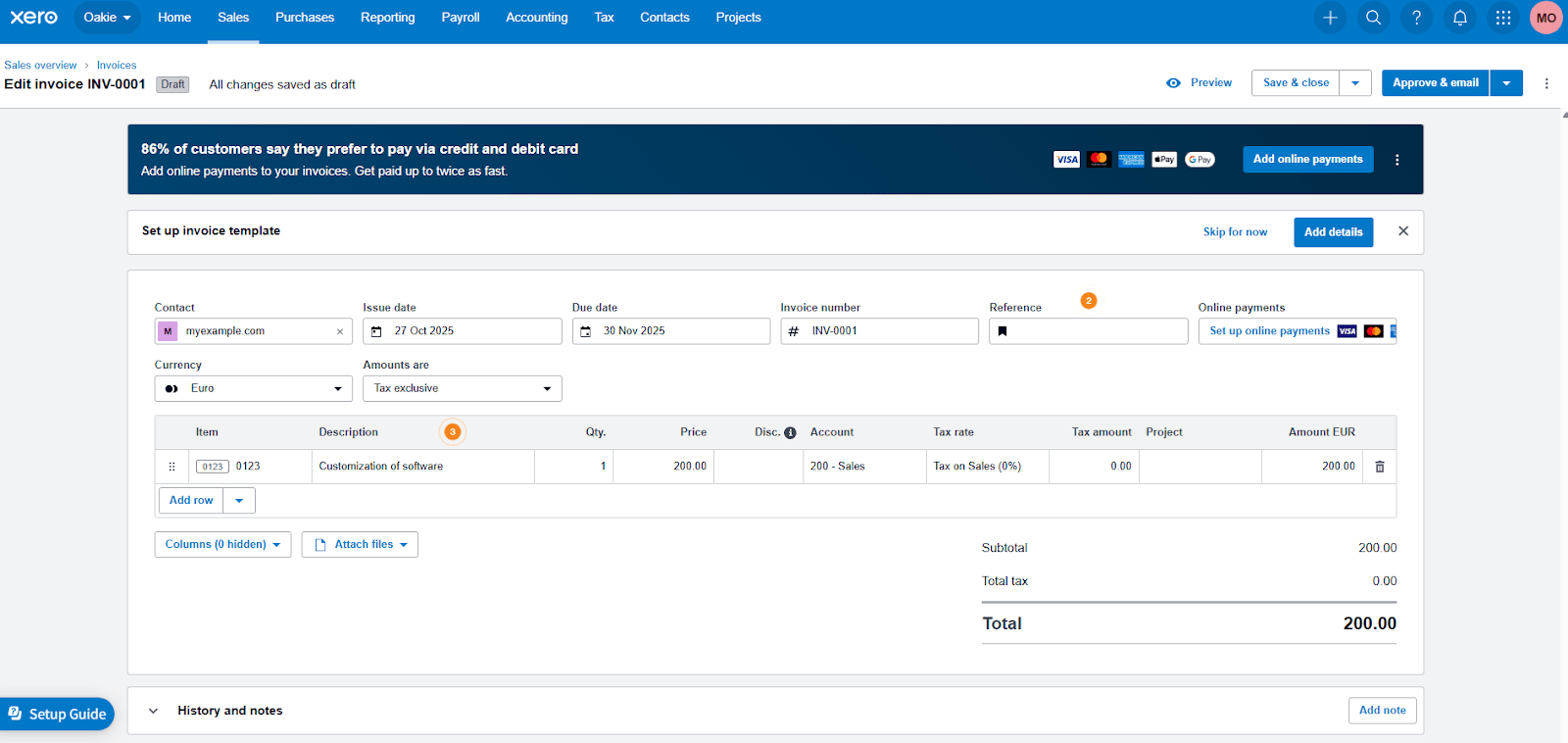
Select "Sales" > "Invoices," then tap "New Invoice."
Load your customer in, explain the service, plug in the price, edit the due date, and add your brand's logo for polish.
Hit "Approve & email," and voilà: off flies your first-ever pro invoice, tracked and logged.
5. Navigating the Xero Dashboard
The dashboard is where everything gets a bird's eye view. You will find the various accounts, the balances of these accounts, and the clear summaries of activity (unpaid invoices, bank reconciliations needed, bills to be paid) that are visually signaled for quick action. Get comfortable and use it every day; and search topics and lessons right within the program.

How to Use Xero for Everyday Business Tasks?
As Xero becomes deeply embedded in your business practices, you will soon notice how the management of daily financial affairs is pretty much seamless. For instance, imagine starting your day logging on and discovering that all your payments and expenses accruing from yesterday’s activities have already been updated by bank feeds. There’s no late-night hassle of importing documents, or messy paper trails of information. Working within Xero’s unified dashboard, it’s an easy step from your transaction reviews to active reconciliation where confirming payments or allocating expenses becomes a rewarding habit rather than a laborious task.
Creating and sending invoices is just as easy: for example, you have a client meeting and you agree to deliver goods and services, but, without any break in moving on from the meeting, you are able to produce a crisp-looking invoice in Xero, which is all ready for dispatch before you leave the coffee shop. This is not just of course a means of avoiding drudgery, it also means that your financial information, cash flow predictions, overdue accounts summary, current balances etc is always available, up-to-date and aspirationally graphic. Compared with legacy working practices, and endless spreadsheets, Xero is exhilarating as it gives you a new sense of financial control and clarity and allows you to move rapidly from insight to action.
Automated Bank Reconciliation in Xero: How It Works
Xero's bank reconciliation could not be easier, particularly for those who are forced to work with ancient bank statements required for matching. Here is how it works when the bank is connected:
- Xero automatically imports your ending transactions securely, encrypted and accurately.
- It suggests matches for each of the deposits/payments, highlighting all (new) transactions and anything that is out of pattern for manual checking.
- Exceptions, splits and partial payments are easily handled, and for instructions on handling these situations, see The Help application (just a click away).
Think of spotting a payment from a client and Xero linking it automatically to that last unpaid invoice from them, and all this while sipping your morning espresso. How's that for power and peace of mind in seconds instead of hours.
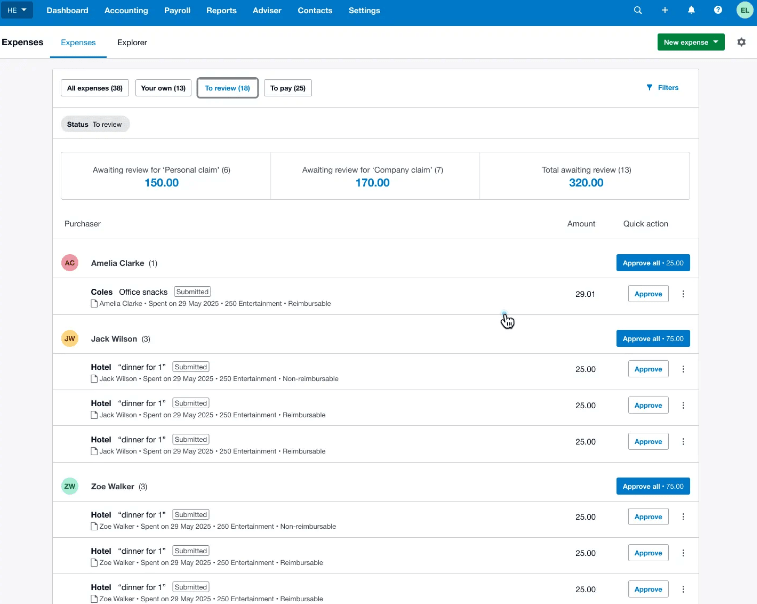
How to Turn Receipts into Expense Claims with Xero
No one will understand the frustration of missing receipts or rushed expense reports more than those in business, and that’s exactly where Xero shines, turning common purchases into digitized, categorized expense claims in very effective ways. The Xero mobile app removes nearly every barrier that used to separate document-handling processes. A quick snap of a receipt immediately uploads the document in your order management process, where you can attach it to a new or ongoing expense claim. Simply choose the right category (meals, travel, or supplies), and assign it for reimbursement of applicable.
This is not only convenient but turns the process into a real time document stream rather than an end-of-month problem. Each document is stored and ready for compliance checks at tax time, as well as giving a full and vivid description of the extent to which money is going out on a daily basis. What once required piles of paper and manual entries is now a seamless, instant flow of information, all capture the moment the receipt hits your hand.
Fast & Easy Invoicing with Xero
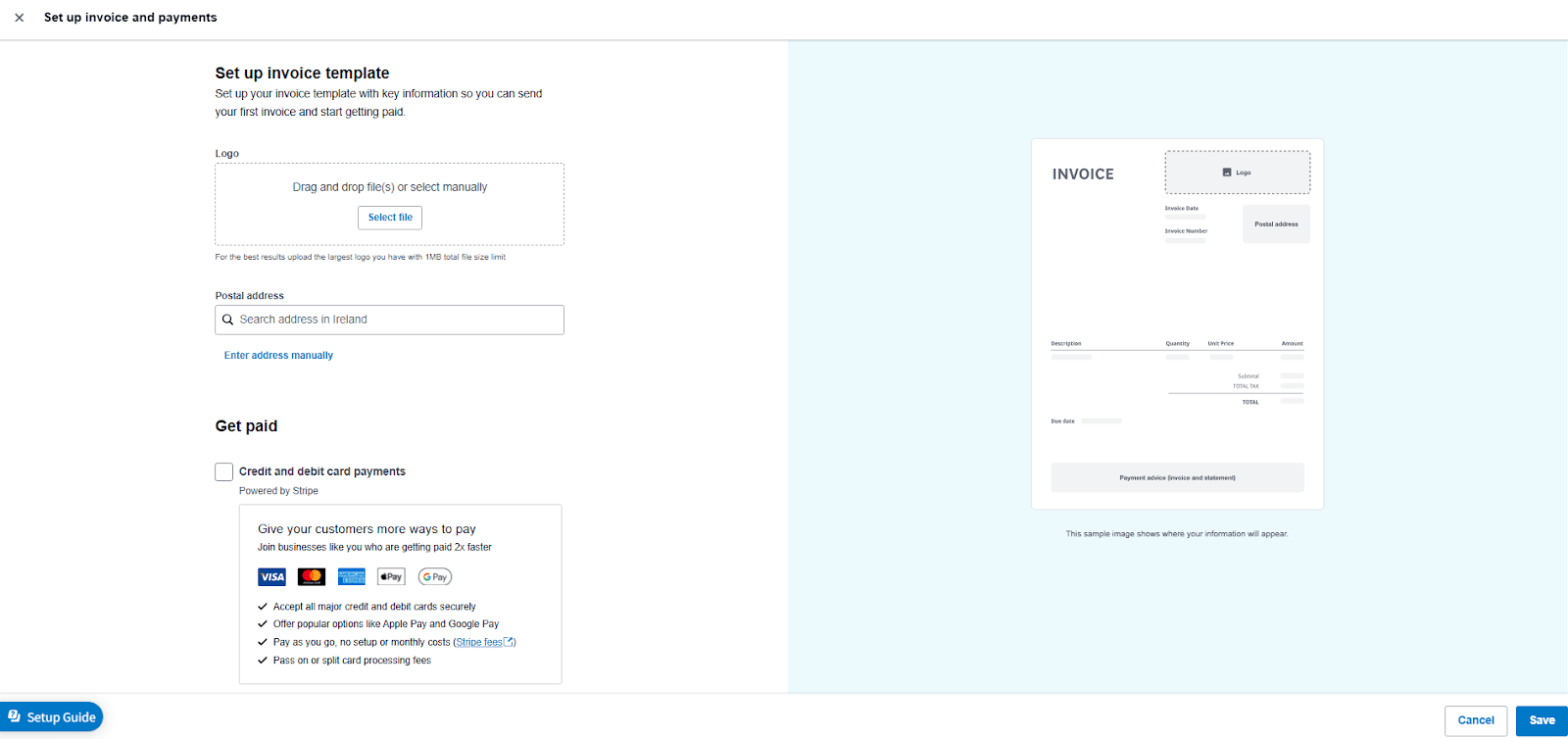
The hallmark of slick cashflow is simple, speedy invoicing. In Xero:
- Select your customer profile (auto-fill for regular clients)
- Add line items from saved product/services, no typing repeat details!
- Adjust payment terms if needed (net 15, net 30, or custom)
- Use document styling (font, color, company logo)
- Activate payment integrations (like Stripe or PayPal) for immediate settlement
What I love: automatic follow-up reminders prod slow-paying clients, so you don’t have to. That single automation alone can pay Xero’s monthly fee several times over.
Simple Payroll Management for Starters in Xero
Payroll management has a terrible reputation for burying small businesses in paperwork but Xero makes it a simple, step-by-step process even for novices. After you have entered most of your simple company data, you will be able to enter employees by using standard forms that record pay scales, jobs, pay frequency and tax records. The payroll flow that follows will take care of all calculations for you so that you do not need to pick up a calculator for any of the deductions, local payroll taxes etc, as they will be automatically taken care of.
When pay day arrives, Xero automatically records the payments made and generates detailed pay slips for your team. It also updates your accounts and compiles the necessary reports for tax or compliance purposes. What once felt like a complex, time-consuming process now happens with far greater efficiency and clarity. As a result, payroll compliance becomes far less stressful, even if this is your first time using payroll software.
Creating and Sending Your First Client Invoice in Xero
Picture yourself as a freelance web designer billing your first project. To do in Xero:
- Go to Invoices, click on “+ New Invoice”.
- Enter customer: “Acme Corp”
- Specify service (ie. “Landing page design”)
- Allocate chargeable hours, or flat fee
- Add any visual mockups (held in your library)
- Specify payment terms (“Due in 15 days”)
- Click on “Preview”, amend when necessary,
- Click on Send and get notified the moment your invoice is opened.
Your records, ready to be used for bookkeeping or audit, will build almost automatically!
Logging a Business Lunch Receipt as an Expense
Imagine grabbing a celebratory client lunch:
- Snap the receipt instantly using Xero’s mobile app.
- Create a new expense: “Business Lunch – New Contract.”
- Auto-suggest “Meals & Entertainment” category.
- Save for end-of-month review or tax deduction calculation.
There’s beauty in handling documentation painlessly at the exact moment, not after the fact.
Reconciling Payments Received with Xero
Let’s imagine a customer pays you by bank transfer for a design job.
- Xero picks this up when it synchronises your accounts next.
- Shows a suggested match: “Invoice #0092 – $500: Smith Design”.
- You click once to put your mark of approval on it – no spreadsheets, no confusion.
- Mark as paid, instantly updating your cashflow tracking.
Multiply this by as little as a couple of clients and see the enormous time (and mental energy) you are saving week after week.
Xero Pricing: The Best Starter Plan for Beginners
Xero offers distinct plans, Starter, Standard, and Premium, to fit different business scales.
- Starter ($29 per month): For single users or very new businesses. With this plan you can send no more than 20 invoices/quotes in a month, reconcile a maximum of 5 bank accounts, capture bills/receipts, and have access to basic reports.
- Standard ($50 per month): Unlimited invoices, bills and more complete reports.
- Premium ($75 per month): Adds multiple currencies and advanced payroll features, but this plan is generally not required for new users.
If you just want to try things out, Xero usually offers a 30-day free trial (no credit card needed), perfect for building confidence risk-free.

Xero Beginner FAQ
How hard is it to learn Xero?
All software packages have learning curves but Xero’s user-friendliness has been designed for the user who wants to escape the spreadsheets. You will have clear menus, hints and tips appearing where relevant!
How quickly can a beginner become productive with Xero?
If given enough time (1-3 hours tutorial time) all users should be invoicing . You will only take a week of gentle exploration before you become competent on the advanced aspects of reconciliation / reports etc. This will be helped by the availability of video tutorials and a demo company provided by Xero.
Can I teach myself Xero without prior accounting experience?
Yes! The vast majority of the features on Xero require zero knowledge of accounting jargon. For all questions answered which are deeper than this, Xero offers self-paced online training as well as a reasonable size support community.
Is Xero better than spreadsheets for business accounts?
Short answer: YES, for almost all growing businesses. You receive trails of audit/ error reduction/ sharing (CPA) and online integrated bank reconciliation. Spreadsheets can work if you have a handful of transactions but can be time wasted and often poor practice once scalability is required or compliance changes.
What kind of support is available for Xero beginners?
Live chat, online webinars, lively user forums, a massive help center, as well as contextual chatbots inside the app. Even at 2 a.m., answers are usually a click away, for more info, review Xero’s customer support page.
Does Xero offer discounts on its subscriptions?
Yes, Joinsecret offers you a 90% discount for 6 months when you use our exclusive promo code for Xero.
Get Started with Xero Quickly – My Closing Thoughts
If you want a painless and expertly-backed method for grasping small business finance, then Xero makes one of the best examples around. Simply follow the steps above, and even those who have never balanced a check book should be able to automate the annoying little admin chores, create slick invoices, and sit back to have peace of mind knowing the numbers are adding up month after month. Ready for a head start? Set your account up through our Xero promo section or try a risk-free 30 days trial, and your future self (and your accountant) will thank you for it.
This guide is here for small business owners, trying to create order from financial chaos. And after many hundreds of Xero set-ups, I sincerely believe it has never been easier to step into pro-grade control of your business books. Once you get the hang of it, you’ll start noticing how much time you free up for real business growth instead of chasing receipts or fixing spreadsheet errors. Xero quietly becomes part of your daily rhythm. Give it a whirl!
{{cta-marketplace="/blog-elements"}}